
WordPress Alternatives for Small Business Websites
By Rome Thorndike
Why Look for Alternatives
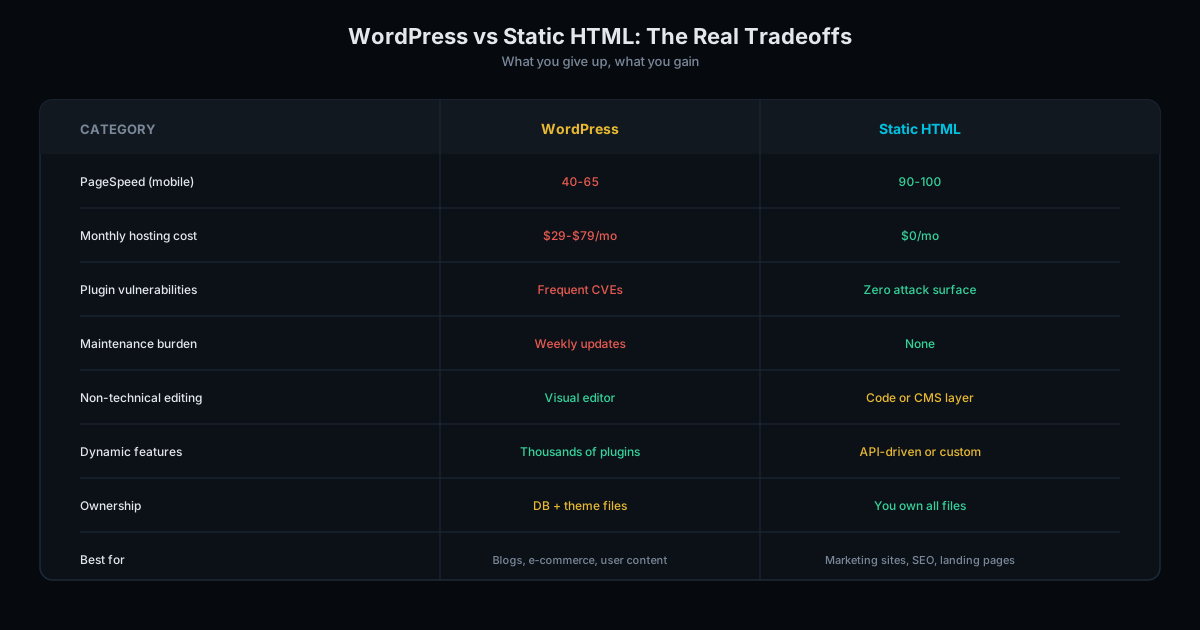
WordPress is powerful but carries overhead most small businesses do not need: plugin maintenance, security patching, database management, PHP updates, and hosting costs. If you are paying $100+/month in hosting and maintenance for a 10-page business site, you are paying for complexity you do not use.
WordPress powers 43% of the web, which also makes it the #1 target for hackers. Outdated plugins are the most common attack vector. If you are not updating plugins monthly, your site is a security liability.
Read why your small business does not need WordPress for the full argument. Below are the alternatives, ranked by performance.
The Alternatives Ranked
| Platform | Mobile PageSpeed | Monthly Cost | Maintenance | Best For |
|---|---|---|---|---|
| Static HTML/CSS | 90-99 | $0 | None | Max performance, zero recurring costs |
| Hugo/Eleventy/Astro | 90-99 | $0 | Minimal | Developer teams wanting markdown content |
| Webflow | 70-85 | $14-39 | Minimal | Design-focused teams needing visual editing |
| Squarespace | 40-65 | $16-49 | Minimal | Non-technical users needing a site today |
1. Static HTML/CSS (best performance). Build cost: $3,000 to $6,000. No database, no plugins, no security patches. The site is a collection of files served directly to the browser. Every byte is intentional. Trade-off: requires a developer for updates (or basic HTML knowledge).
2. Webflow (best visual builder). Check Webflow's pricing page for current rates. Produces cleaner output than WordPress. Trade-off: platform lock-in, recurring fees, 15-25 points slower than static on mobile.
3. Squarespace (easiest to use). The lowest barrier to entry. Trade-off: slowest performance of any mainstream option, limited customization, no code export.
4. Hugo/Jekyll/Eleventy (developer tools). Static site generators that build HTML from markdown files. Same performance as hand-coded static, with a content workflow. Trade-off: requires developer skills for setup and theming.
Migration: What Changes and What Stays
Migrating from WordPress does not mean starting from scratch. Here is what transfers:
- Design: Your visual design is replicated in the new platform. Same colors, fonts, layout, and branding.
- Content: All text, images, and pages transfer. Blog posts export from WordPress as XML.
- URL structure: We preserve your existing URLs so search rankings are not affected. 301 redirects handle any URL changes.
- SEO signals: Title tags, meta descriptions, heading structure, and internal links transfer. Domain authority stays intact.
What you lose: WordPress plugins (replaced by built-in functionality or simpler tools), the WordPress admin dashboard (replaced by direct file editing or a simpler CMS), and the ability to install themes (your design is custom, not a theme).
Read our static sites vs WordPress comparison for a detailed performance breakdown.
Security Comparison
WordPress is the most targeted CMS on the internet. Its plugin ecosystem is the primary attack surface: outdated plugins account for the majority of WordPress breaches. If you run a WordPress site, you need to update plugins weekly, monitor for vulnerabilities, and maintain security plugins that add their own performance overhead.
Static HTML has no attack surface. There is no database to inject, no admin panel to brute-force, no plugins to exploit. The site is a set of read-only files served from a CDN. Security maintenance is zero.
Webflow and Squarespace handle security on their platforms, which removes the burden from you but introduces platform dependency. If a vulnerability is discovered in Squarespace's infrastructure, you wait for them to fix it. With static HTML, there is nothing to exploit in the first place.
For small businesses that cannot afford a dedicated security team (which is most small businesses), eliminating the attack surface is better than trying to defend one. Visit WordPress.org and check the changelog for the frequency of security patches. Each patch is a vulnerability that existed on your site until you updated.
Our Recommendation
For most small businesses: static HTML/CSS. The performance advantage is significant, the total cost of ownership is lowest, and you own everything. The only trade-off (needing a developer for updates) is minimal for sites that change a few times per year.
If you need a visual editor for frequent content changes and can accept 70-85 PageSpeed scores, Webflow is the best builder. If you need a site today with zero technical involvement, Squarespace gets you online fastest.
Migrating from WordPress? Our migration service preserves your design and SEO while eliminating the overhead. See our pricing page for migration rates. Contact us or audit your WordPress site to see the potential improvement.
Frequently Asked Questions
Which alternative is cheapest long-term?
Static HTML. Build cost of $3,000 to $6,000 with $0 recurring costs. Over 3 years, total cost equals the build fee. Every other option has monthly platform fees that accumulate.
Which alternative is best for SEO?
Static HTML. 90-99 PageSpeed scores, full control over schema markup, and no platform overhead give static sites the best Core Web Vitals scores. SEO features like meta tags and sitemaps are built into the static build process.
Can I switch from WordPress to any of these?
Yes. We migrate WordPress sites to static HTML, preserving the design, URL structure, and SEO signals. Webflow and Squarespace also allow migration but with platform lock-in. Static HTML is the only alternative with zero lock-in.
Ready to Fill Your Next Event?
We build the page, set up the pixels, and run the ads. You run the event.