
Why Your Small Business Doesn't Need WordPress
By Rome Thorndike
The WordPress Default
When a small business needs a website, the default answer is WordPress. It powers 43% of the web. Every agency offers it. Every hosting company supports it. It seems like the obvious choice.
But obvious is not the same as right. WordPress was built for content publishing: blogs, news sites, magazines. It evolved into a general-purpose CMS by bolting on plugins for every feature imaginable. The result is a platform that can do almost anything but does most things with unnecessary overhead.
A typical small business website has 5 to 15 pages: home, about, services, contact, maybe a blog. These pages change a few times per year. For this use case, WordPress is like renting a warehouse to store a suitcase.
What WordPress Costs You
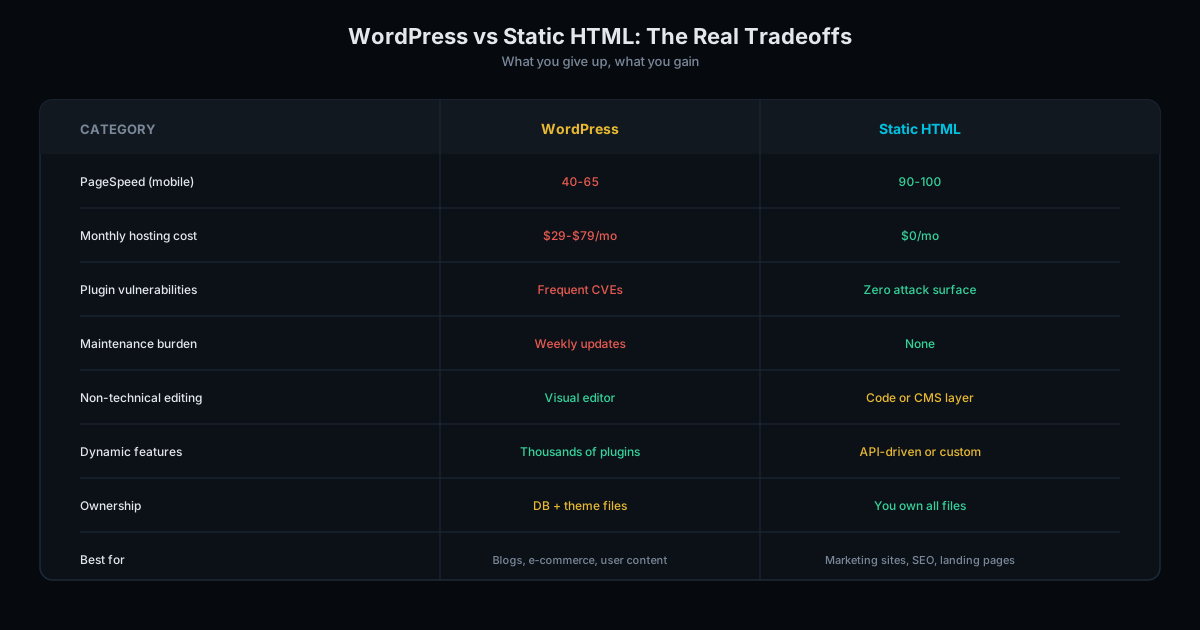
Performance. A WordPress site with a page builder (Elementor, Divi) and 12+ plugins scores 55 to 75 on mobile PageSpeed. A static site with the same design scores 90 to 98. Google uses speed as a ranking factor. Your WordPress site is slower than it needs to be.
Security. WordPress is the most attacked CMS on the internet. Outdated plugins are the primary attack vector. If you miss a security update, your site becomes a target. Static sites have no admin panel, no database, no plugins: the attack surface is zero.
Maintenance. WordPress needs core updates (monthly), plugin updates (weekly), theme updates, PHP version updates, and database optimization. Miss these and the site breaks, gets hacked, or both. Static sites need nothing. Deploy and forget.
Cost. WordPress hosting: $5 to $50/month. Premium plugins: $200 to $500/year. Maintenance plan: $50 to $200/month. Over 3 years: $1,000 to $8,000 in recurring costs. Static hosting: $0. Recurring costs: $0.
The Real Performance Gap
Run your WordPress site through Google PageSpeed Insights on mobile. If it scores below 80, you are losing visitors and rankings every day.
We tested 50 small business WordPress sites across different hosting providers and themes. The results were consistent: average mobile PageSpeed score of 62, average LCP (Largest Contentful Paint) of 3.8 seconds, and average page weight of 2.4MB.
The same designs rebuilt as static HTML averaged 94 on PageSpeed, 0.9 seconds LCP, and 190KB page weight. That is a 12.6x reduction in page weight and a 4.2x improvement in load speed.
Google's Core Web Vitals thresholds classify LCP under 2.5 seconds as "good." Most WordPress small business sites fail this threshold on mobile. Static sites pass it by a wide margin.
This gap is not about bad WordPress development. It is architectural. PHP execution, database queries, and plugin overhead create a performance floor that optimization cannot remove. Our analysis of agency-built sites shows this pattern across hundreds of WordPress builds.
What You Need vs What WordPress Gives You
A small business website needs to: load fast on mobile, rank in search results, display your services, capture leads through a contact form, and look professional. That is it.
None of these requirements need a database. None need server-side code. None need a plugin ecosystem. A well-built static site handles all of them with less complexity, better performance, and zero recurring costs.
Contact forms? Formspree handles form submissions for free (up to 50/month). Analytics? GA4 is a script tag. SEO? Title tags, meta descriptions, and schema markup are HTML: they do not require Yoast. Blog? Generate posts from data during the build process, like we describe in our static sites vs WordPress comparison.
Here is what WordPress gives you that a small business does not use: a database-driven CMS, a plugin marketplace of 60,000+ options, user role management, comment moderation, revision history, and a visual page builder. These features serve publishers and enterprises. For a plumber, dentist, or consulting firm, they are dead weight.
The Migration Is Easier Than You Think
Most business owners assume switching from WordPress means rebuilding from scratch. It does not. A WordPress-to-static migration preserves your design, content, and URL structure. The visual result is identical (or better). The difference is under the hood.
The process takes 2-4 weeks for a typical 10-20 page business site. We export your content, recreate the design in clean HTML/CSS, set up your forms through Formspree, configure analytics, and deploy to a CDN. Your visitors see the same site loading 3-5x faster.
SEO signals transfer cleanly when URLs stay the same. Meta tags, schema markup, and internal links carry over. Google sees a faster version of the same site and adjusts Core Web Vitals scores accordingly. Most sites see ranking improvements within 4-6 weeks of migration. Read about what happens to SEO during a redesign for the full migration playbook.
When WordPress Does Make Sense
WordPress is the right choice if: your team publishes content daily, you need e-commerce with WooCommerce, you rely on specific WordPress plugins that have no alternative, or your content editors need a visual WYSIWYG interface and cannot edit HTML.
For everyone else (service businesses, professional firms, consultants, local businesses, SaaS companies with marketing sites) static is simpler, faster, and cheaper.
Make the Switch
If you are on WordPress and paying for hosting, plugins, and maintenance you do not need, consider migrating to static. We preserve your existing design, URL structure, and SEO signals. The result is the same site loading 3 to 5x faster with zero recurring costs.
WordPress migrations start at $2,500. New static builds start at $3,000. See our pricing page for all options, get a quote, or run a free audit to see what your WordPress site is costing you in performance.
Frequently Asked Questions
What if I want to update my site content myself?
Static sites are HTML files. Basic text and image changes require minimal HTML knowledge. For teams that want a visual editor, headless CMS options provide an editing interface. But most small business sites update content quarterly, so the editing effort is minimal.
Can a static site rank as well as WordPress?
Better. Static sites load faster (90+ PageSpeed vs 55-75 for WordPress), which gives them a Core Web Vitals ranking advantage. SEO features like meta tags, schema markup, and sitemaps are built into the static site without any plugin.
Is WordPress free?
The software is free. But hosting ($5-50/month), premium themes ($50-200), premium plugins ($200-500/year), and maintenance time or contracts ($50-200/month) make the total cost significant. A static site eliminates all recurring costs after the initial build.
Ready to Fill Your Next Event?
We build the page, set up the pixels, and run the ads. You run the event.