
What Is a Static Website? Speed, Cost, SEO
By Rome Thorndike
Static vs Dynamic: The Core Difference
A static website is a collection of pre-built HTML, CSS, and JavaScript files. When a visitor requests a page, the server sends that file directly. No database queries, no server-side code execution, no page assembly. The file is ready before anyone asks for it.
A dynamic website (WordPress, Webflow, Squarespace) builds each page on demand. The server runs code, queries a database, assembles the page from templates and content, then sends the result. This happens on every single page load unless caching is configured.
Both approaches produce the same thing: an HTML page in the browser. The difference is when that page gets built. Static sites build once, serve many times. Dynamic sites rebuild on every request.
Why Static Is Faster
A WordPress page load involves: DNS lookup, TCP connection, PHP execution, MySQL database query, template assembly, and HTML delivery. Total server response time: 200 to 800 milliseconds before the browser receives the first byte.
A static page load involves: DNS lookup, TCP connection, and file delivery from a CDN edge node. Total server response time: 10 to 50 milliseconds. The page is already built. The CDN serves it from the closest geographic location.
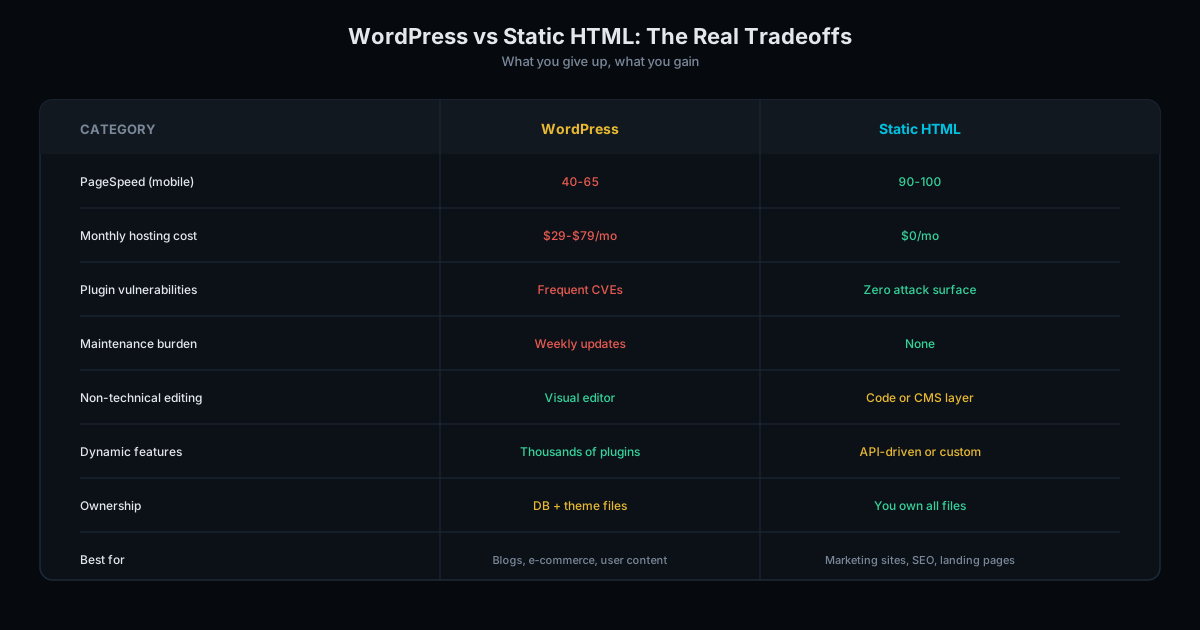
The result shows in PageSpeed scores. WordPress sites score 55-75 on mobile. Static sites score 90-98. That gap is architectural: no amount of WordPress optimization closes it because the overhead is baked into how dynamic sites work.
Google uses Core Web Vitals as a ranking factor. Faster sites get a ranking boost. In competitive search categories, that boost determines page 1 vs page 2. According to Google's own research, 53% of mobile users abandon a page that takes over 3 seconds to load.
How Static Sites Are Built
Static sites are generated by build tools (sometimes called static site generators). The process works like this: content goes in as data (JSON, Markdown, CSV), templates define the layout, and the build script combines them into finished HTML pages.
For a 20-page business site, the build takes 2-5 seconds. For a 500-page programmatic SEO site, 15-30 seconds. The output is a folder of HTML, CSS, and image files that gets uploaded to a CDN.
Popular static site generators include Hugo, Eleventy, Jekyll, and custom Python or Node.js scripts. At SharpPages, we use Python build scripts that give us full control over output, schema markup, and internal linking architecture.
Updates work the same way. Edit the source data, run the build, upload the new files. The entire site rebuilds in seconds. No login panels, no WYSIWYG editors, no database migrations.
What Static Sites Can (and Cannot) Do
Static sites handle: Marketing sites, business websites, landing pages, blogs, portfolios, documentation sites, event registration pages, and programmatic SEO at scale (hundreds of pages generated from data).
Contact forms work through external services like Formspree or Netlify Forms. The form submits data to a third-party API: no server-side code needed on your site.
E-commerce is possible with tools like Snipcart or Stripe Checkout. Product pages are static HTML. The cart and payment processing run through hosted APIs. For catalogs under 500 products, this approach works well.
Static sites are not ideal for: E-commerce with real-time inventory, social networks, web applications with user accounts and real-time data, or sites where non-technical editors publish content daily. For these use cases, a dynamic backend makes sense.
Most business websites do not need dynamic features. They have 5 to 50 pages that change a few times per year. For these sites, WordPress adds complexity and overhead without providing value.
SEO Advantages of Static Sites
Static sites have structural SEO advantages that go beyond speed. Every page is a standalone HTML file with its own URL, title tag, meta description, and schema markup. There is no JavaScript rendering required for Google to read the content.
Google's crawler (Googlebot) processes static HTML instantly. Dynamic sites that rely on JavaScript rendering face a two-phase indexing process: Google fetches the page, then returns later to render the JavaScript. This delay can mean days or weeks before content appears in search results.
Static sites also produce cleaner HTML. No plugin bloat, no framework overhead, no unused CSS classes. Googlebot processes smaller, cleaner pages faster, which matters when you have hundreds of pages to index. Google's SEO starter guide emphasizes page speed and clean HTML as ranking fundamentals.
The Cost Advantage
Hosting: Static sites host for free on GitHub Pages, Cloudflare Pages, or Netlify. WordPress hosting costs $5 to $50 per month. Over 3 years, that is $0 vs $180 to $1,800.
Maintenance: Static sites have no CMS to update, no plugins to patch, no PHP versions to upgrade. WordPress requires updates every 2 to 4 weeks. Neglected updates lead to security vulnerabilities: WordPress is the target of 90% of CMS-based attacks.
Security: A static site has zero attack surface. No database to inject, no admin panel to brute-force, no plugins with vulnerabilities. The site is a folder of files on a CDN.
We build static sites starting at $3,000 for standard business sites. No recurring platform fees. No maintenance contracts. Check our pricing page for full details. Learn more about our web design service or get a free audit of your current site.
Frequently Asked Questions
Can a static site have a blog?
Yes. Blog posts are generated during the build process from structured data. Each post gets its own URL, schema markup, and SEO tags. Adding a new post means adding content to the build data and running the build script.
Is a static site the same as a single-page app?
No. Single-page apps (SPAs) are JavaScript-heavy applications that run in the browser. Static sites are pre-built HTML pages that load instantly without waiting for JavaScript to render content. SPAs often have worse PageSpeed scores than static sites.
Can I edit a static site without coding?
Basic edits require editing HTML files. For teams that need a visual editor, headless CMS tools (Netlify CMS, Contentful) can provide an editing interface that outputs to static files. For most business sites that update quarterly, editing HTML directly is straightforward.
Ready to Fill Your Next Event?
We build the page, set up the pixels, and run the ads. You run the event.