
Conference Website Checklist: 12 Must-Haves for Registration, Speakers, and SEO
By Rome Thorndike
Registration
Registration is the primary conversion. Every other element on the site supports it.
- Registration CTA visible above the fold on every page
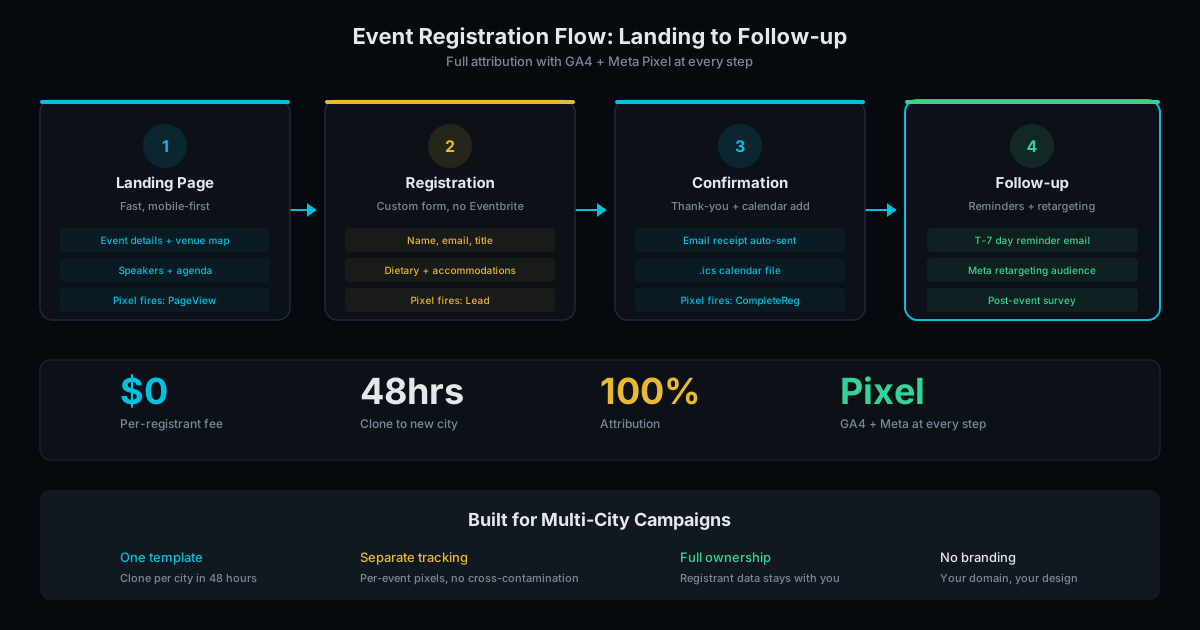
- Form fields minimized: name, email, company (collect details in the confirmation flow)
- Multiple ticket tiers displayed with pricing
- Early bird pricing with a deadline that creates urgency
- Group discount option visible on the pricing table
- Mobile-optimized form that can be completed with one thumb
- Confirmation page with calendar invite download (.ics file)
- Automated confirmation email with event details, venue directions, and next steps
The registration form should load in under 2 seconds on mobile. Test yours with Google PageSpeed Insights. If your form page scores below 80, attendees are bouncing before they finish registering.
See our guide on building high-converting registration pages for design patterns that increase completion rates.
Speakers and Agenda
Speaker pages: Each speaker gets a dedicated section or page with photo, name, title, company, bio, and session title. Link to their LinkedIn or website. Speaker names drive search traffic: people search for speakers before deciding whether to register.
Agenda display: Use a clear, scannable format. Each session needs: time slot, session title, speaker name, and track (if multi-track). The agenda must be mobile-friendly because attendees reference it on their phones during the event. Add filtering by track or topic for agendas with 15+ sessions.
Timing matters: Publish speakers and agenda as early as possible. These are the primary decision factors for registration. A "Speakers TBA" page does not convert. Even 3-4 confirmed speakers with the promise of more drives registrations better than an empty page.
Schema markup: Add Event schema to the main page with the event name, date, location, and ticket URL. This helps Google display rich results for conference-related searches. Add BreadcrumbList schema on interior pages (speakers, agenda, venue) for search navigation.
Sponsors
Sponsors expect visibility. Your conference website is a deliverable in the sponsorship package.
- Dedicated sponsors page with tiered display (Platinum, Gold, Silver)
- Sponsor logos on the homepage (at minimum, top-tier sponsors)
- Each sponsor gets: logo, company description, and website link
- Higher tiers get larger logos, more prominent placement, and possibly dedicated content sections
Make the sponsor section part of your website template so adding a new sponsor is a content update, not a design change. Each new sponsor is a 5-minute addition, not a redesign ticket.
Logo specifications: Request sponsor logos in SVG or high-resolution PNG format. Set a standard display size per tier (e.g., Platinum: 200px wide, Gold: 150px, Silver: 100px). Compress all images before uploading. Unoptimized sponsor logos are one of the most common causes of slow conference pages.
SEO and Tracking
Target keywords: "[conference topic] conference [year]" and "[industry] conference [city]." Write unique title tags and meta descriptions for every page. The homepage targets the primary conference keyword. Speaker pages target speaker names. Agenda pages target session topics.
Tracking setup: GA4 with conversion events on registration completion. Meta Pixel for retargeting visitors who viewed the registration page but did not complete it. UTM parameters on all promotional links (email, social, partner sites) for channel attribution.
Domain strategy: A persistent conference website (same URL year over year) accumulates domain authority. Redirect last year's URL to this year's page instead of creating a new domain each year. A conference site on year three of the same domain ranks dramatically better than a brand-new domain.
Read about Core Web Vitals to understand the performance metrics Google uses for rankings. Conference sites with scores above 90 rank higher and retain more mobile visitors.
Mobile Optimization
Over 60% of conference website traffic comes from mobile devices. Attendees check the agenda on their phones, register during commutes, and share the event link via text. Every element must work on a 375px screen.
Mobile checklist:
- Registration form completable without horizontal scrolling
- Agenda readable without pinching to zoom
- Speaker photos load quickly (compressed, lazy-loaded)
- CTA buttons are at least 44px tall for tap targets
- Venue map embeds load on demand, not on page load
Test mobile performance with Google's Core Web Vitals assessment. Aim for LCP under 2.5 seconds and CLS under 0.1. Most conference sites built on platforms like Wix or Squarespace fail these thresholds because of framework overhead.
Build Your Conference Site
We build websites for conference organizers with registration flows, speaker pages, sponsor displays, and full tracking. 90+ PageSpeed ensures attendees do not bounce waiting for the agenda to load on their phones.
Conference sites: $2,000 to $4,000 for the initial build. Multi-event cloning and multi-city scaling available. See our pricing page for full details.
Contact us to plan your conference website.
Frequently Asked Questions
How early should the conference website launch?
4-6 months before the event for annual conferences. This gives time for SEO to build and for early bird registration to drive revenue. At minimum, launch with the date, location, and registration form. Add speakers and agenda as they are confirmed.
Should I keep the website up after the conference?
Yes. Add recap content, photos, video highlights, and attendee testimonials. This content ranks for conference-related searches and builds credibility for next year. Redirect the URL to next year's page when registration opens.
How do I handle different ticket types?
Display ticket tiers on the registration page with a feature comparison table showing what each tier includes. For complex pricing (early bird plus tier combinations), keep the display simple and handle edge cases in the checkout flow, not on the marketing page.
Ready to Fill Your Next Event?
We build the page, set up the pixels, and run the ads. You run the event.