
Multi-City Event Marketing at Scale
By Rome Thorndike
The Multi-City Problem
You have an event that works in one city. Now you need to run it in 5, 10, or 20 cities. Each city needs its own registration page with city-specific details: venue, date, local speakers, directions.
The traditional approach: rebuild the page for each city. 20 cities = 20 builds. At $2,000-4,000 per page, that is $40,000-80,000 in build costs. Plus weeks of timeline.
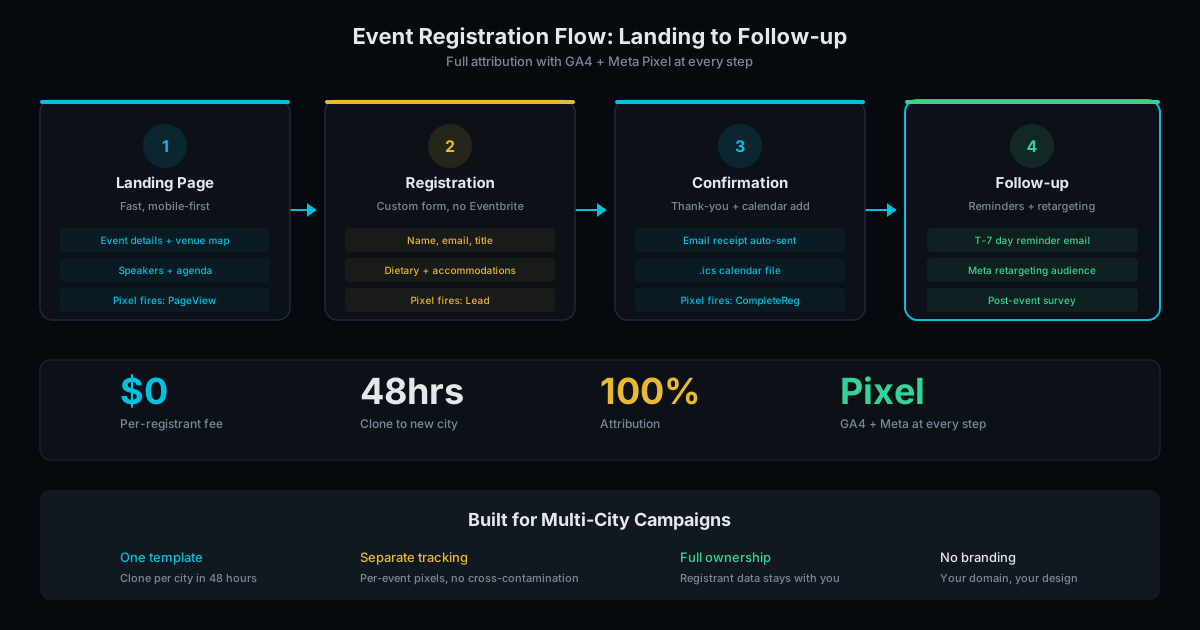
The clone approach: build one template page, then clone it for each city with only the city-specific content changed. 20 cities = 1 build + 20 clones. Total cost is dramatically lower and each clone launches in 48 hours.
How Cloning Works
The first event page is the template. It establishes the design, layout, messaging, form structure, and tracking setup. Every element that stays the same across cities is locked into the template.
For each additional city, we update only what changes:
- City name in headlines and meta tags
- Event date and time
- Venue name, address, and directions
- Local speakers or panelists
- City-specific imagery (optional)
- UTM parameters for city-level tracking
The registration form, GA4 tracking, Meta Pixel, design, and core messaging stay identical. Consistency across cities strengthens your brand. City-specific details make each page feel local.
City Page SEO and Local Relevance
Each city page is a unique URL with unique meta tags, heading tags, and city-specific content. This is not duplicate content in Google's eyes because the geographic targeting differs for each page.
For SEO, each city page can rank for "[event name] [city]" and related local searches. A 10-city tour creates 10 indexable pages, each targeting a different local market. Over time, these pages accumulate backlinks from local media coverage, sponsors, and attendees who share the city-specific URL.
Include local details that go beyond the city name swap:
- Venue description. "Located at the Austin Convention Center, 2 blocks from 6th Street" is local. "Located at the event venue" is generic.
- Local speaker bios. Mention their connection to the city: "Based in Denver for 15 years, Sarah runs the largest fintech meetup in Colorado."
- Travel and parking info. Nearby hotels, parking garages, public transit routes. This content is useful for attendees and signals geographic relevance to Google.
- Past event photos from that city. If you have run the event before, show photos from the last time. Returning events with local visual proof convert better than first-time events with stock imagery.
For more on building local content at scale, see our programmatic SEO guide, which covers templated content strategies.
Tracking Across Cities
Multi-city events need city-level attribution. You need to know which city drives the most registrations, which city has the lowest cost per registration, and which promotion channel works best in each market.
The setup:
- Unique UTM parameters per city. Every link to a city page includes
utm_campaign=event-name&utm_content=city-name. GA4 reports show registrations by city. - City-specific conversion events. Each city page fires a GA4 event tagged with the city name. One dashboard shows all cities side by side. Set this up in GA4 during initial configuration.
- Shared Meta Pixel with city segmentation. One Pixel across all pages. Use custom parameters to segment audiences by city for retargeting campaigns.
With this setup, you can answer questions like: "Chicago had the lowest cost per registration at $8.40, while Miami was $22.10. What is different about the Miami market?" That data drives better budget allocation for future tours.
Managing a Multi-City Launch Timeline
A common mistake: trying to launch all cities simultaneously. This creates a content bottleneck (10 venues, 10 speaker lists, 10 sets of logistics all due at once) and prevents you from learning what works.
Better approach:
- Week 1-2: Build and launch the template city. This is your flagship. Run ads, send emails, track conversion rates. Optimize the page based on data.
- Week 3-4: Launch cities 2-4. Apply lessons from the flagship: if adding a countdown timer boosted conversions by 12%, add it to the template before cloning.
- Week 5+: Roll out remaining cities at 2-3 per week. Each clone takes 48 hours, so 2-3 per week is sustainable without rushing.
This staggered approach lets you optimize the template before scaling. A 5% conversion improvement on the template compounds across every city clone. For a 20-city tour driving 500 visitors per city page, a 5% improvement means 500 additional registrations across the tour.
Scale Your Event Tour
Our event page service is built for multi-city scale. First city template: $2,000 to $4,000. Each additional city clone: $500 to $1,000 with 48-hour turnaround.
For a 10-city tour: $2,000 + (9 x $500) = $6,500 to $13,000. Compare that to rebuilding each city at $2,000-4,000 each ($20,000-40,000).
No per-registrant fees. No platform lock-in. You own every page and every data point. See pricing details or contact us to plan your event tour.
Frequently Asked Questions
How fast can you add a new city?
48 hours from receiving the city-specific content (venue, date, speakers). The clone process updates only what changes. The structure, design, and tracking are already built.
Can each city page have a different design?
The core design stays consistent for brand coherence. City-specific elements (hero image, local speakers, venue photos) can vary. If you need a different design per city, each becomes a custom build rather than a clone.
What happens to city pages after the event?
Options: redirect to a thank-you/recap page, archive with photos and highlights for SEO value, or redirect to the next year's page. We recommend keeping pages live with event recaps because they accumulate domain authority over time.
Ready to Fill Your Next Event?
We build the page, set up the pixels, and run the ads. You run the event.