
Eventbrite Alternatives for Corporate Event Registration
By Rome Thorndike
Why Corporate Events Outgrow Eventbrite
Eventbrite works well for public events, concerts, and community gatherings. For corporate events (conferences, executive dinners, product launches, speaker series), it falls short in three areas:
- Branding. Eventbrite-hosted pages look like Eventbrite. Your brand takes a backseat to the platform. For corporate events where brand perception matters, this is a liability.
- Fees. 3.7% + $1.79 per paid ticket adds up fast. A 300-person corporate event at $500/ticket costs $6,087 in platform fees. See Eventbrite's pricing page for current rates.
- Data ownership. Eventbrite owns the attendee relationship. They send Eventbrite-branded emails. They suggest similar events (potentially your competitors'). Your attendee data lives on their platform.
Check Eventbrite's current pricing and calculate your per-event fees. For high-ticket corporate events, the numbers are substantial.
The Alternatives Compared
| Platform | Best For | Cost | Mobile PageSpeed | Data Ownership |
|---|---|---|---|---|
| Custom Pages | Most corporate events | $2,000-4,000 one-time | 90-99 | Full |
| Splash | 20+ events/year, marketing teams | $1,000-5,000/mo | 50-70 | Platform-hosted |
| Cvent | 1,000+ attendee conferences | $5,000-20,000+/yr | 45-65 | Platform-hosted |
| Hopin/Luma | Virtual and hybrid events | $99-799/mo | N/A (app-based) | Platform-hosted |
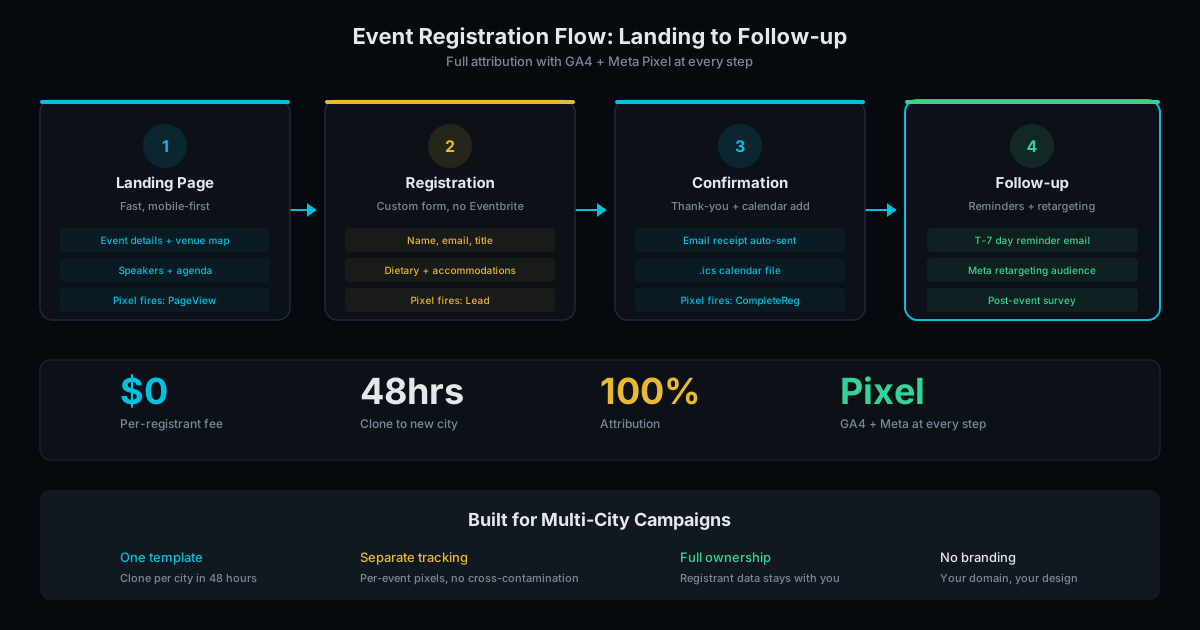
Custom registration pages deliver the best combination of cost, performance, and ownership for most corporate events. A branded, fast-loading page on your domain with zero per-registrant fees. Stripe handles payments at 2.9% + $0.30 (lower than Eventbrite). Clone cost for multi-events: $500 to $1,000 each.
Splash is an enterprise event marketing platform with better branding than Eventbrite, event analytics, and email workflows. Worth the cost for marketing teams running 20+ events per year who need advanced analytics and self-service page creation.
Cvent is an enterprise event management suite: registration, venue sourcing, attendee management, and onsite tools. Worth it for large organizations running complex multi-day conferences with 1,000+ attendees and dedicated event staff.
Hopin and Luma serve virtual and hybrid events where the platform provides the virtual venue. They solve a different problem than Eventbrite.
The Fee Comparison
For a 300-person corporate event at $500/ticket ($150,000 in gross revenue):
| Platform | Fee Calculation | Total Fees |
|---|---|---|
| Eventbrite | 3.7% + $1.79 per ticket | $6,087 |
| Custom + Stripe | 2.9% + $0.30 per ticket | $4,440 |
| Splash | Monthly platform fee | $12,000-60,000/yr |
| Cvent | Annual contract | $5,000-20,000/yr |
Custom pages with Stripe save $1,647 per event compared to Eventbrite on payment processing alone, plus you eliminate the platform fee entirely after the one-time build cost. For organizers running 5+ events per year, the annual savings exceed $8,000.
Read our detailed guide to cutting registration fees to $0 for the full ROI breakdown.
Data Ownership and Brand Control
On Eventbrite, your attendee data lives on their platform. Eventbrite sends attendees Eventbrite-branded emails. After registration, Eventbrite suggests similar events to your attendees, which may include your competitors' events. You cannot control this cross-promotion.
With custom registration pages, every touchpoint is yours. The registration page is on your domain. The confirmation email comes from your email address. The attendee data goes to your CRM or spreadsheet. No third party inserts itself between you and your attendees.
For corporate events where the attendee relationship has long-term value (potential clients, partners, or recruits), giving that relationship to a platform is a strategic mistake. The attendee list from a well-run corporate event is worth more than the event itself. Own it.
Brand control extends to the registration experience. Eventbrite pages look like Eventbrite, with their navigation, footer, and design language. A custom page matches your website, your brand guidelines, and your design system. For companies that invest in brand consistency, an Eventbrite registration page is a jarring departure from the rest of the attendee experience.
Choose Your Path
For most corporate events (10-1,000 attendees, in-person, brand matters): custom registration pages. The build cost is lower than one year of platform fees. The page loads faster, converts better, and you own the data.
For event-heavy organizations (50+ events/year, complex workflows): Splash or Cvent may justify their cost through operational efficiency.
Our event page service builds custom registration pages that replace Eventbrite for corporate events. See our pricing page for current rates, or contact us to calculate your fee savings.
Want to see what a conference website should include? Read our conference website checklist for the full list of features.
Frequently Asked Questions
Can a custom page do everything Eventbrite does?
It handles registration, payment processing (via Stripe at lower fees), confirmation emails, calendar invites, and attendee tracking through GA4. It does not include Eventbrite's event discovery marketplace, which drives organic traffic to public events like concerts and festivals. For corporate events where attendees come from targeted outreach, email campaigns, and direct invitations, the discovery marketplace provides zero value.
What about refund handling?
Stripe handles refunds through their dashboard. Full or partial refunds with one click. You can issue refunds within seconds, and the funds return to the attendee's card within 5-10 business days. The refund flow is simpler than Eventbrite's because you control the relationship directly with no platform intermediary.
How do I manage attendees without a platform?
Form submissions export to a spreadsheet or sync to your CRM (HubSpot, Salesforce, or similar). For events under 1,000 attendees, a spreadsheet handles check-in lists, dietary needs, session selections, and badge printing. For larger events, tools like Attendease or Bizzabo provide dedicated attendee management without the per-registrant fee overhead of Eventbrite.
Ready to Fill Your Next Event?
We build the page, set up the pixels, and run the ads. You run the event.